Cloud-Burst Your Local Agent Without Leaking Context
Running heavy agent work on rented GPU is fine. Letting your vault, project state, and provider keys leak through a poorly-architected cloud burst is not. Here's the git-worktree + branch-separation pattern that keeps the boundary clean.
Last updated:
Renting a GPU for an hour to do agent work you can’t do locally is a fine idea. Letting the harness yeet your entire vault, your dotfiles, and your provider keys onto a rented box because it was easier than thinking is not. The local-first thesis doesn’t end when you need more RAM. It hardens.
Most “cloud burst” setups people roll fail one of three ways: they sync too much, they race the vault’s own git automation, or they trust the remote process with credentials it didn’t need. All three are avoidable.
What cloud-burst actually has to do
You hit a task local hardware can’t carry: an embedding run over the whole vault, a render that needs more VRAM than you own, a parallel fanout that needs more RPM than your free-tier provider gives one instance. You don’t want to buy hardware for it. You want to rent it for an hour and tear it down.
The mechanism has to provision a clean remote instance, move only the files the task needs, run the agent there, move the resulting edits back, merge them without racing the local vault’s own git automation, and tear down the instance on idle. Anything more is a leak. Anything less is a broken loop.
The git-worktree pattern
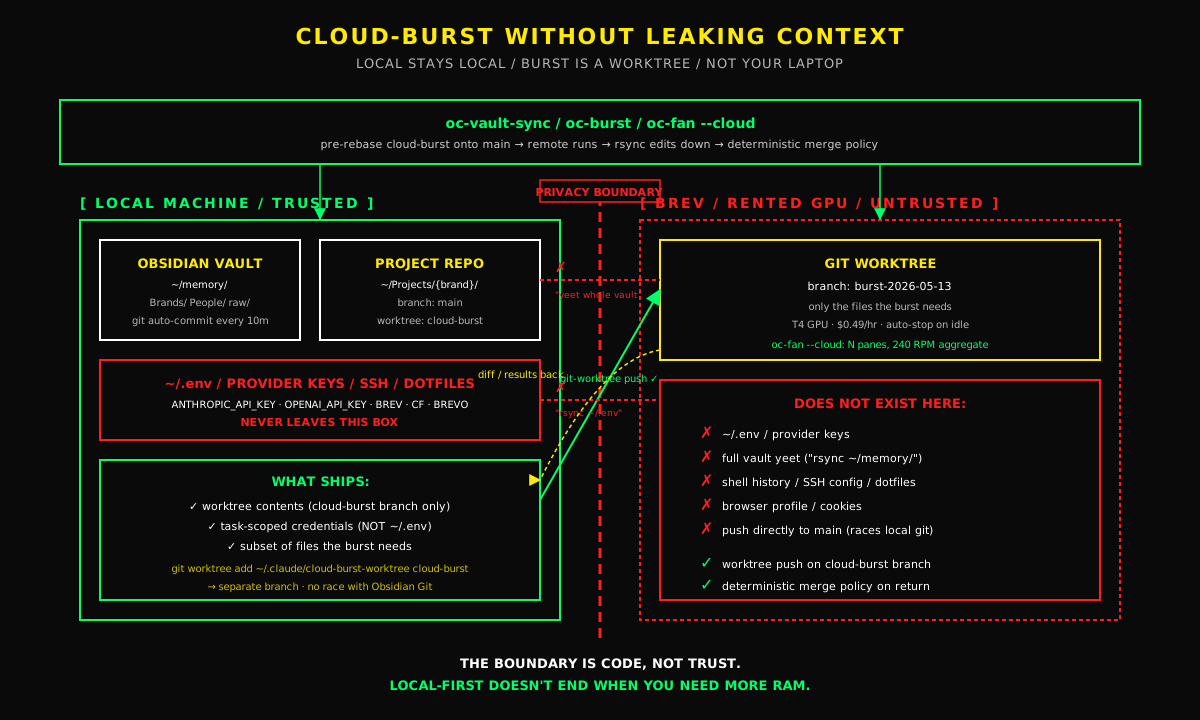
The pattern that survives contact with reality is a separate branch and a separate worktree on the local side.
git worktree add ~/.claude/cloud-burst-worktree cloud-burst creates a second checkout of the same repo on a different branch. The remote instance only ever touches files inside that worktree. The local Obsidian Git plugin only ever touches main. They cannot race each other because they’re on different branches in different working directories.
Before the burst fires, rebase cloud-burst onto main so the remote instance starts from the latest local state. After the burst finishes, rsync the remote edits down into the local worktree, commit on cloud-burst, then merge cloud-burst into main with a deterministic conflict policy.
That conflict policy matters. For brand notes, people notes, workflow notes, theirs: the burst’s intentional agent work wins. For changelog sections, both sides append in chronological order. For daily logs, both sides append and dedupe by timestamp. For opencode.json, .gitignore, and Dashboard.md, ours: local wins, flag for manual resolve.
Without that policy you spend Sunday afternoon resolving merge conflicts. With it the merge is mechanical.
Parallel fanout at single-instance cost
The harder version of the same problem is parallel work: six agents at once, each on a decomposed piece. Locally that’s six tmux panes thrashing CPU and saturating one provider’s rate limit. Remotely it’s six instances at six times the cost, unless you architect it.
The oc-fan --cloud pattern is one Brev instance ($0.49/hr T4), N tmux panes, each pane using a different model from a rotation pool: six independent 40 RPM ceilings, 240 RPM aggregate, at single-instance cost. The decomposer splits the multi-part prompt into N independent subtasks. Each pane runs its subtask. The merge protocol catches all six edits.
What does NOT leave the building
The local-first rule does not get suspended because you spun up a remote instance. Specifically:
- Provider keys live in your local environment. The remote instance gets task-scoped credentials, not your full
~/.env. - Your full vault does not sync. Only the worktree at the branch the burst is using.
- Your shell history, your SSH config, your dotfiles, your browser profile, do not sync. They have no business on a rented box.
- The remote instance auto-stops on idle. The instance dies in five minutes if no one’s typing. You don’t pay for forgotten state.
If the architecture can’t enforce these boundaries, the architecture is wrong.
When to burst, when not to
Heuristics that actually hold up:
- Local RAM under 2 GB free → burst.
- Embedding the whole vault → burst.
- Render that needs more VRAM than your machine has → burst.
- Six-way parallel decomposition →
oc-fan --cloud. - A regular code task that fits in local context → stay local. Cloud-burst is not the default. It’s the escape hatch.
The router decides. oc <prompt> runs heuristic detection plus a free Llama 3.3 70B routing call when the heuristic is ambiguous. The JSON decision says mode: burst or mode: fan-cloud or mode: local, with a reason field. You can read it. You can override with --no-route. You can dry-run with --route-explain.
Defaulting to local and bursting on demand is the opposite of the SaaS-AI pattern of routing every task to the most expensive cloud lane. It costs less. It leaks less. It runs faster on the 90% of work that doesn’t need a GPU.
What this looks like with oc
oc-burst "<prompt>" provisions or reuses a Brev instance, runs the worktree sync, executes the prompt remotely, syncs the edits back, and triggers the merge. oc-fan --cloud does the same with parallel panes. oc-vault-sync handles the pre-burst rebase, the post-burst merge, and (optionally) installs a pre-push hook so the Obsidian Git plugin’s next push includes both local and burst edits.
oc-burst upgrade swaps to a higher VRAM tier mid-task: stop instance, snapshot state, delete, recreate at the new tier, restore state. --dry-run prints the plan without doing the swap. The mechanism is in the open-source repo. The boundary is enforced by code, not by hoping the agent didn’t misbehave.
Local-first doesn’t mean you never use cloud. It means the boundary is yours.
Quick Answers
Why not just SSH into a GPU box and run the agent there?
Because then the agent has full write access to your live vault, your shell, and your provider keys, while you have zero conflict isolation against the Obsidian Git plugin that's auto-committing every ten minutes. You'll lose work to merge conflicts inside a week.
Does cloud-burst mean my code leaves the machine?
Some of it does: the code the burst instance needs to do the work, on a dedicated branch, scoped to the task. The point of the pattern is that you control exactly what leaves and exactly what comes back, instead of the harness deciding for you.
Why a separate branch instead of pushing directly to main?
Because the local Obsidian Git plugin pushes main every ten minutes. If the burst instance also pushes main, you race. A `cloud-burst` branch with a smart merge policy keeps both sides moving without trampling.